> For the complete documentation index, see [llms.txt](https://docs.ergonode.com/llms.txt). Markdown versions of documentation pages are available by appending `.md` to page URLs; this page is available as [Markdown](https://docs.ergonode.com/apps2/quick-start.md).
# Quick start
Overview of steps required to create an App
To create an App you only need basic development knowledge.
You are not limited to a specific programming language, only to the possibilities granted via Ergonode by its communication interfaces.
To develop a functional App you only need to follow a couple of simple steps.
## Create a Manifest
[Manifest reference](/apps2/detailed-reference/manifest.md)
Firstly, you need to provide a Manifest - a simple JSON file determining the basic App behavior and possibilities it is utilizing.
The file is required for the app registration process for the New App to display in your available apps tab.
## Prepare authentication
[Authentication reference](/apps2/detailed-reference/authentication.md)
Next up it's essential to keep your data safe. To achieve that you should have a functional authentication system.
The App has to be able to identify itself so that Ergonode will know it can perform the API operation it is trying to execute. It is also crucial that when the App receives a request it can determine whether it comes from a trustworthy source.
On App installation, Ergonode exchanges handshake with App with data allowing authentication of the following requests performed, assuring that no 3rd party is tempering the data.
## Handle your configuration
[Configuration reference](/apps2/detailed-reference/configuration.md)
Some Apps require dedicated configuration. Once provided by Manifest App users will be able to set up their App within Ergonode to make it work appropriately to the installation needs - App should validate and persist your configuration.
## Implement event endpoints
[Event endpoints reference](/apps2/detailed-reference/event-endpoints.md)
If your App needs to know about basic events create specific events handling.
## Implement your business logic
It is up to you what exactly the App will do.
## Implement synchronization endpoints
This step is optional and depends on your intent.
[Synchronization endpoints reference](/apps2/detailed-reference/synchronization/synchronization-endpoints.md)
If your App is meant to generate a file, integrate the data into the eCommerce system, or has a similar purpose forcing having the long-running process to handle all of the data, rather than implementing the entire synchronization yourself, let Ergonode orchestrate the process and focus only on the development of your business logic.
## Host your application
Host your application on an HTTP server of choice.
{% hint style="info" %}
For development and testing use tools like [ngrok](https://ngrok.com/) to make quicker code iterations.
{% endhint %}
{% hint style="info" %}
Ergonode currently does not provide hosting for custom Apps.
{% endhint %}
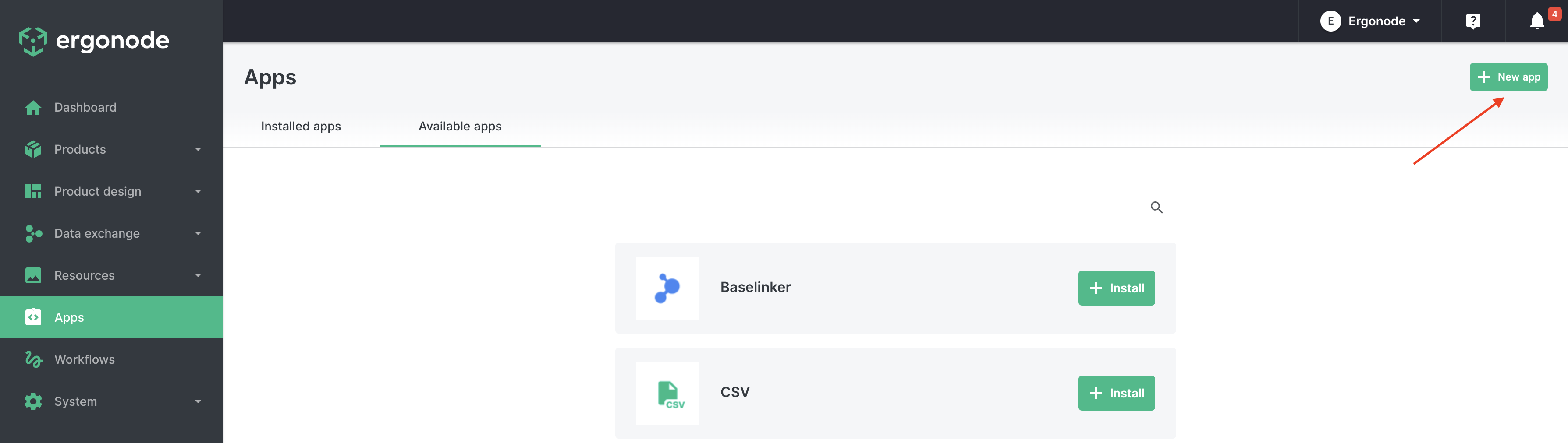
## Register your App
Once all set up register your App in the available apps tab.
{% hint style="info" %}
To refresh the App Manifest, it has to be changed and reapplied just like on App registration. Ergonode does not refresh it automatically.
Remember also, on refreshment, to raise the version - otherwise, changes won't be applied as described in the [version](/apps2/detailed-reference/manifest.md#version) restrictions description.
{% endhint %}
Click on New app button
Fill your Manifest URL
---
# Agent Instructions
This documentation is published with GitBook. GitBook is the documentation platform designed so that both humans and AI agents can read, navigate, and reason over technical content effectively. Learn more at gitbook.com.
## Querying This Documentation
If you need additional information that is not directly available in this page, you can query the documentation by asking a question.
Perform an HTTP GET request on the following URL with the `ask` and `goal` query parameters:
```
GET https://docs.ergonode.com/apps2/quick-start.md?ask=&goal=
```
`ask` is the immediate question: it should be specific, self-contained, and written in natural language.
`goal` is what the user is ultimately trying to achieve, the reason they need the answer. Sharing it helps GitBook give you a better, more relevant answer. A goal is most helpful when it describes the outcome the user wants rather than restating the question. For example, with `ask=how do I create an API token`, a goal like `automate deployments from our CI pipeline` lets GitBook tailor the answer to that use case.
The response will contain a direct answer to the question and relevant excerpts and sources from the documentation.
Use this mechanism when the answer is not explicitly present in the current page, you need clarification or additional context, or you want to retrieve related documentation sections.